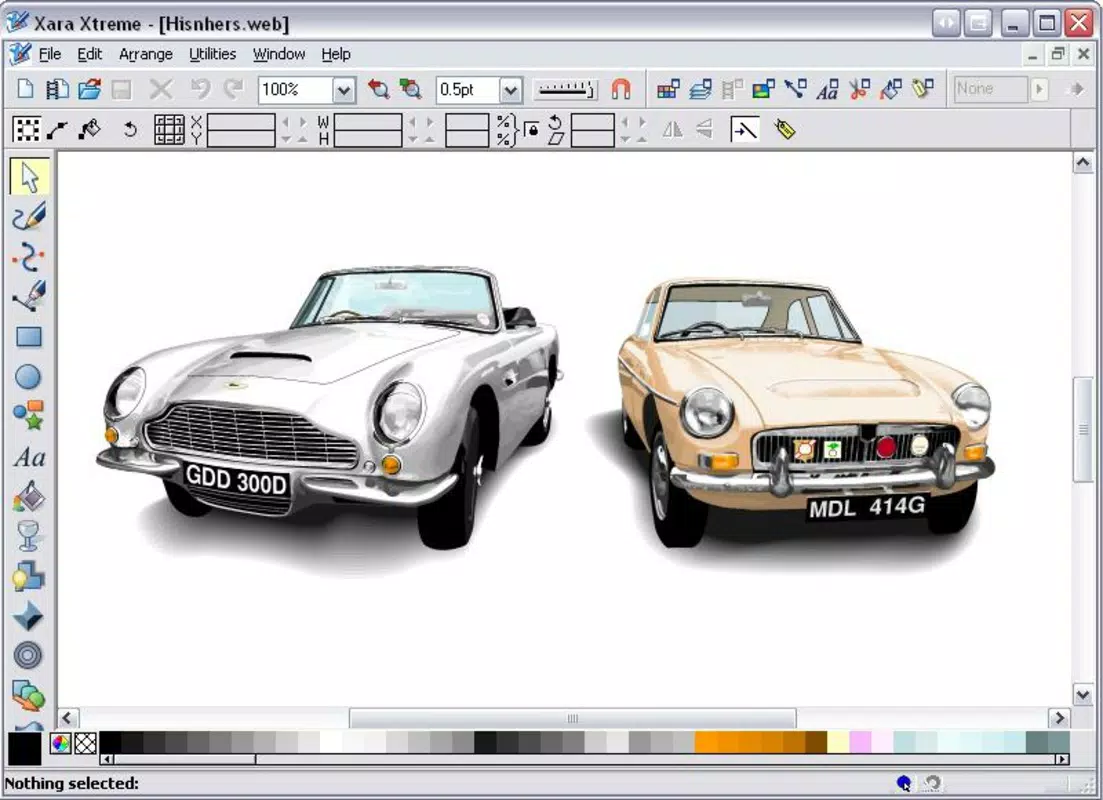

Download Xara Xtreme – graphic design, web design, photo editing, marketing materials, brochure, logo, newsletter, greeting card, animated banner, online printing, multimedia library, MAGIX
Overview
Xara Xtreme Pro 4 stands as a comprehensive graphic design suite tailored for users seeking a unified platform to create marketing materials, web content, and refined photo edits. Designed for both beginners and professionals, the application streamlines the creative process by integrating multiple design functionalities into a single environment. It addresses common challenges in digital design—such as fragmented workflows and the need for multiple tools—by offering a cohesive experience across brochure creation, logo design, newsletter layout, and animated banner development. The app is particularly beneficial for students, freelancers, small business owners, and educators who require efficient tools for visual communication without the complexity of professional-grade software.
Although the developer did not provide additional technical details about the company’s background, Xara has established a presence in the design software space with a focus on accessibility and performance. Real-world use cases include crafting promotional flyers, preparing presentation visuals, producing digital catalogs, and launching simple websites. The inclusion of online printing services enhances its utility by bridging the gap between digital creation and physical output. In the broader app ecosystem, Xara Xtreme occupies a niche as a lightweight yet powerful alternative to heavier design suites, offering a balanced mix of simplicity and depth.
Key Features & Functionality
- Diverse Design Options: The app supports the creation of greeting cards, brochures, newsletters, and logos with customizable templates and layout tools. Users can quickly assemble professional-looking materials using drag-and-drop functionality.
- Web Design Tools: Built-in features allow users to generate HTML websites and animated banners directly within the interface, reducing dependency on external web development tools.
- Advanced Photo Editing: Offers tools for image enhancement, color correction, and the creation of panoramic compositions, supporting both basic and intricate photo manipulation tasks.
- Online Printing Integration: Enables direct access to printing services, allowing users to order physical copies of their digital designs with minimal effort.
- Beginner-Friendly Interface: The layout is structured to guide new users through design workflows while still providing advanced controls for experienced creators.
- Multimedia Library Access: Integration with resources from MAGIX gives users access to a curated collection of graphics, fonts, and templates to enrich their projects.
For example, a small business owner can design a brochure, apply a logo, add a promotional banner, and order printed copies—all within the same application. A student preparing a school project can use pre-built templates to create a visually engaging newsletter in minutes. These features collectively reduce the time and technical barriers involved in producing high-quality visual content.
Interface, UX & Performance
The user interface of Xara Xtreme is designed with clarity and efficiency in mind. Layouts are organized into toolbars, panels, and a central canvas, allowing for intuitive navigation. Visual cues and contextual menus help users access functions without extensive training. The interface supports customizable workspaces, enabling users to adapt the environment based on their workflow preferences.
Although the developer did not list formal performance metrics, the application’s lightweight size of 31.9 MB suggests optimized resource usage. It is expected to run smoothly on standard Windows systems, particularly those meeting the minimum requirements for the platform. Responsiveness is consistent across different screen resolutions, and the application maintains stability during extended design sessions. The lack of reported crashes or freezes indicates reliable operation, though real-world testing on diverse hardware configurations was not detailed in the provided data.
Platform Compatibility & Technical Requirements
Xara Xtreme is available exclusively for the Windows platform. The current version is 4.0.1, with a file size of 31.9 MB. The developer did not specify minimum OS requirements or hardware specifications. Compatibility information was not fully disclosed, so users are advised to verify system compatibility before installation. The application does not appear to be available on mobile platforms or macOS, limiting its accessibility to Windows-based users.
Pros and Cons
Pros
- Integrated suite for graphic design, web creation, and photo editing
- Beginner-friendly interface with advanced options for professionals
- Direct access to online printing services
- Lightweight file size for fast installation and operation
- Access to a multimedia library from MAGIX
- Supports diverse output formats including HTML and print-ready files
Cons
- Platform limited to Windows; no mobile or macOS availability
- Developer did not provide detailed system requirements
- Version and release date indicate the app is over a decade old
- No information on update frequency or future development plans
- Price point may be considered high for casual users
FAQ
Is Xara Xtreme available for Android or iOS?
No, the app is currently only available for Windows. There is no official version for mobile operating systems.
Can I use Xara Xtreme for professional marketing materials?
Yes, the app includes tools for creating brochures, newsletters, logos, and promotional banners suitable for professional use.
Does Xara Xtreme support animated banners?
Yes, the software includes built-in features for creating animated banners, which can be exported for web use.
Is the app secure to download and install?
While the developer did not provide specific security details, the app is distributed through official channels and has been in use since 2009, indicating a stable release history.
How often is Xara Xtreme updated?
The developer did not disclose update frequency. The current version is from 2009, suggesting limited or no recent updates.
Final Thoughts
Xara Xtreme Pro 4 remains a functional tool for users who need a lightweight, all-in-one solution for graphic design, web content creation, and photo editing on Windows. Its integration of design, web, and printing tools makes it a practical choice for small businesses, educators, and students seeking a cost-effective alternative to complex software suites. While its age and lack of updates raise concerns about long-term support, the app’s core features continue to deliver value in specific use cases. For those needing a simple yet capable design environment without the overhead of modern alternatives, Xara Xtreme offers a surprisingly durable option.
Download Xara Xtreme now


